SUAS
Student Unmanned Aerial Systems competition (SUAS) is, at its core, a mock search-and-rescue mission for a drone your team builds entirely yourselves. The challenge this year features:
- Autonomous Flight
- Humans cannot take over flight (the most they can do is add waypoints)
- Obstacle Avoidance
- Avoid other aircraft sharing the airspace
- Object Detection, Classification, Localization
- Scan a search area, detect objects, and provide GPS position
- Air Delivery
- Autonomously deliver a payload to a detected GPS position
 |
|---|
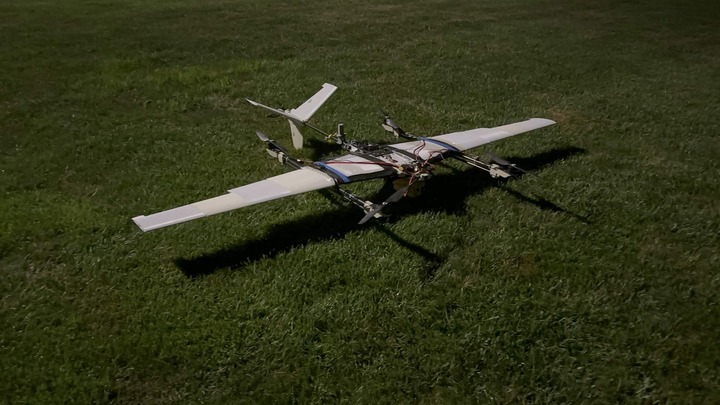
| This is our current UAV: A VTOL (Vertical Take Off and Landing) |
I joined Rose-Hulman's SUAS team with the intention of mainly doing software and was given the job to work on the vision stack. Our team had already decided that we were going to use a YOLO model in order to detect this years objects. All I had to do was write the software that converted the YOLO output to GPS coordinates.
Custom object tracker? Why
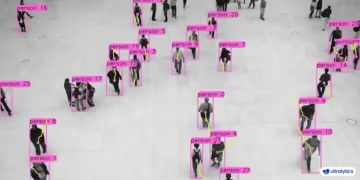
If you've looked into YOLO before, you know that Anthropic has given you pretty much everything. They provide out of the box trackers that work like magic, advanced algorithms such as Kalman Filters, etc.
 |
|---|
| Out of the box algorithm, BoT-SORT |
Why not just use one of their tools?
Movement? no Movement
Well for starters, this application is hugely different. The only thing moving is the UAV, not the target. This widely invalidates loads of the backend for out of the box trackers with things like velocity trackers and more.
Off screen tracking shenaigans
Even if the movement didn't matter at all, these trackers are NOT meant to handle things going off screen whatsoever! Yes, you could argue that options such as ReID could solve these problems, but it's just not meant for this. We need to:
- Store everything we've seen FOREVER
- Gather confidence over MULTIPLE passes of the same object
- Create a map of all contenders use the first 2 bullets
- (Slightly unrelated) Use a custom mapping algorithm in order to compensate for lens distortion
Standard YOLO architecture simply can't do this
This was also a good opportunity for me to write some REALLY cool
code 😗
Tuning The Tracker
I'm going to save the article for the actual tracker later because I'm currently in the process of tuning it! I still have some awesome stuff to talk about! Particularly, the entire tuning tool I'm currently finishing up!
 |
|---|
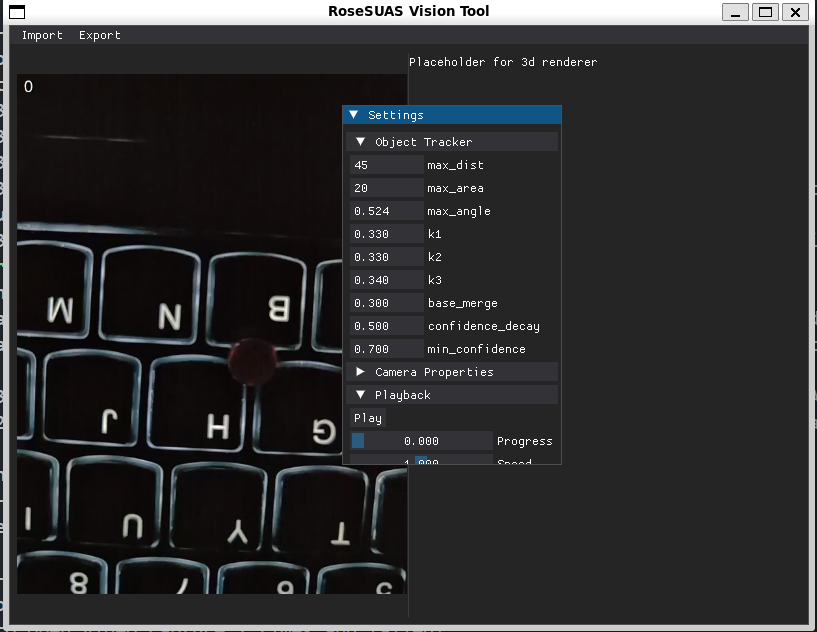
| Current progress on the tracker |
Side tangent: We love interpreted languages
Look at this luxurious piece of code
def enum_obj(obj: object) -> None:
    for attr_name in vars(obj):
        if attr_name.startswith('_'): # Skip privates
            continue

        value = getattr(obj, attr_name)

        def set_cb(sender, set_value, attr_name):
            setattr(obj, attr_name, set_value)

        if isinstance(value, int):
            dpg.add_input_int(
                label = attr_name,
                callback = set_cb,
                default_value = value,
                on_enter = True,
                user_data = attr_name,
                step = 0,
                width = width
            )
        # ...
For making a piece of code for literally tuning variables inside of dataclasses, interpreted goodies like this are GOLD. Yes, you could probably do this in C or some other compiled language (not Java though, Java decorators are sexy) after smashing your head on your keyboard for an hour or 2 and giving a finger to the preprocessor gods—but stuff like this is just so clean
Awesome parallel video decoding
Anyway, from the screenshot you can see that on the left side of the tuning window there's the video input, and on the right side there's the (unimplemented) 3d render of tracker outputs.
Now, I could just run cv2.VideoCapture.read every single loop and rely
on my computer's storage to be fast enough to deliver a smooth 24 FPS...
But that's too easy! (Also from for me thats disapointing)
Instead let's thread a ring buffer!
def _decode_loop(self) -> None:
    while self.running:
        framepos = self._cap.get(cv2.CAP_PROP_POS_FRAMES)

        ret, frame = self._cap.read()

        if not ret:
            logging.error(f"Failed to read video frame number {framepos}")
            continue

        self._framebuffer[self._tail] = self.convert_cap_to_out(frame)
        self._tail = (self._tail + 1) % len(self._framebuffer)
        self._size += 1
        self._condition.notify_all()
This was roughly the initial ring buffer I landed at. You can see I added
a funky convert_cap_to_out which is actually abstract! This is so we
can also offload the array resizing that we're going to need to do
anyway. There's some BIG problems with this though once you add the
dequeue function (typical threaded procedures):
def pop_frame(self) -> np.ndarray:
    ret = self._framebuffer[self._head]
    self._head = (self._head + 1) % len(self._framebuffer)
    self._size -= 1
If you're well-versed in memory you definitely see some screaming issues to say the least... "shallow copies" make a horrible race condition. When a frame is popped from the queue, the frame you popped is only available until its replaced, meaning that we have a race between sending the data to the GPU and reading a new frame from the disk!
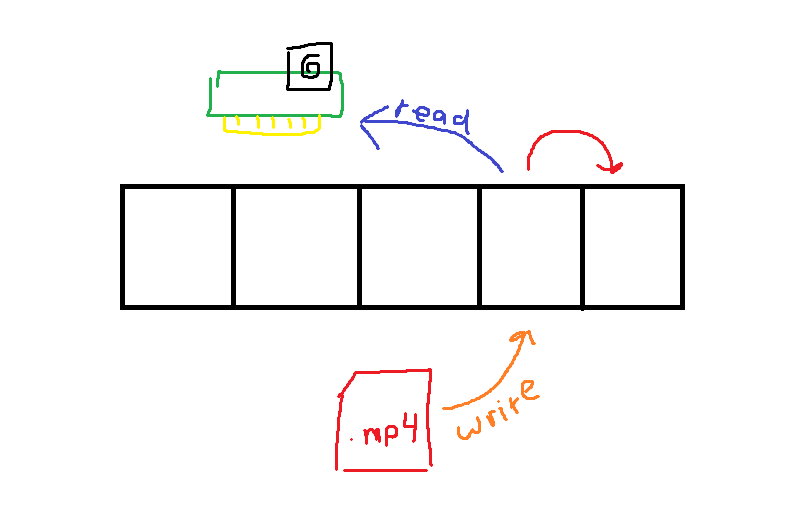
The solution isn't too horrible:
- Use
threading.Conditionto lock size and save valuable unused clock cycles while idling - Split the pop functions into 2 functions, a
graband apopfunction. The grab will be used to get a reference to the array and the pop will tell the thread that we're clear to destroy it
However once we add video scrolling it becomes a hell of a lot worse.. OpenCV will outright crash the program if you touch the frame position while it's reading a frame so you must:
- Queue frame changes and make the frame changes actually happen inside of the decode loop
- Allow offsets to frame grabs in order to make it so you can occupy 2 frames at a time—The previous frame (that is still being rendered at this time) and the new frame (that we are fetching currently from the grab function). Then we can pop the old frame after we tell the GPU to look at another reference
When I asked AI (Claude, Gemini) for help while debugging these issues, the solutions they proposed were actually leagues worse than what I ended up using.. AI is the new "Rubber Duck Debugging"
I love Python's manager system
The rest of the stuff about the vision tool is mainly boring GUI talk, so I'll omit those details. I would love to talk about Python's manager system.
Whoever designed this, you are amazing.
def __enter__(self) -> Self:
    # We need to do initial setup for dearpygui
    dpg.create_context()
    dpg.create_viewport(title = self.title, width = self.width, height = self.height)
    dpg.setup_dearpygui()

    self._setup_ui()
    self._setup_input()

    dpg.show_viewport()
    return self

def __exit__(self, exc_type, exc_val, exc_tb) -> None:
    dpg.destroy_context()
It's so seamless and intuitive—It simplifies management and memory. I truly think that (at the cost of a lot of indentation at times) its truly one of the best and most clear variable scope management techniques I've ever seen. Cudos.